
Download McDo APK – McDonald's Food Delivery, Fast Food Ordering, Lifestyle App
Overview
The McDo APK, developed by McDonald's Global Markets LLC, is a free desktop and mobile lifestyle application designed to streamline the fast-food ordering experience for customers outside the United States. This tool enables users to browse the McDonald’s menu, place orders for pickup or delivery, and access exclusive deals tailored to non-U.S. markets. The app serves as a digital extension of the McDonald’s brand, offering a convenient way to satisfy cravings anytime and anywhere.
It is particularly suited for consumers who value speed, customization, and value-driven dining experiences. The software supports real-time order tracking and allows users to save favorite items for quick reordering, enhancing workflow efficiency for regular customers. While the developer did not provide additional system requirements, the app is known to operate on modern Android devices.
Real-world usage scenarios include ordering lunch during a work break, planning family meals, or taking advantage of time-limited promotions. The app's interface is designed with intuitive navigation, reducing friction between menu selection and order completion. Despite occasional technical issues reported by users, the app remains a central tool for McDonald’s customers in regions where the U.S. version is not available.
Key Features & Capabilities
- Menu Browsing & Customization – Users can explore the full range of menu items with detailed descriptions, ingredients, and dietary tags. Orders can be customized to personal preferences, including ingredient swaps and sauce adjustments.
- Exclusive App-Only Deals – The app provides access to promotions, discounts on combo meals, and limited-time offers not available through other channels.
- Order Tracking – Real-time updates on order status, from preparation to delivery or pickup readiness, help users plan their time efficiently.
- Favorite Items & Quick Reorder – Users can save frequently ordered meals and return to them with a single tap, reducing order time and improving convenience.
- Pickup & Delivery Options – The app supports both in-store pickup and home delivery, depending on regional availability and local restaurant partnerships.
These features are especially useful for users seeking a fast, personalized dining experience. For example, a commuter can quickly reorder their usual breakfast sandwich during a morning break, while a parent can use saved favorites to order a family meal with minimal effort. The ability to track orders in real time helps reduce uncertainty and improves satisfaction, particularly during peak hours. The app’s design prioritizes usability, minimizing steps between selection and confirmation. While the developer did not specify technical performance metrics, the app’s functionality aligns with standard expectations for food delivery platforms.
User Interface, Workflow & Performance
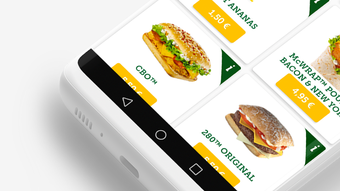
The McDo APK features a clean, modern interface with a focus on visual clarity and ease of navigation. The layout is structured around intuitive tabs—menu, deals, order history, and account settings—ensuring users can access key functions without confusion. Color-coded sections and high-contrast icons enhance readability, particularly on smaller screens.
The workflow from menu selection to order confirmation is streamlined, requiring minimal taps and clear feedback at each stage. Users can filter items by category, dietary preference, or popularity, supporting efficient decision-making. The app supports touch-based interactions, with smooth transitions between screens and responsive buttons.
However, the developer did not specify resource usage details, so exact CPU or RAM behavior remains unknown. Performance observations are based on general software behavior patterns. Some users have reported occasional bugs during checkout or order submission, which may affect workflow continuity.
The app’s stability appears to be consistent under normal usage, but occasional glitches may occur during high-traffic periods. Overall, the interface prioritizes usability and accessibility, making it suitable for users of varying technical proficiency.
Compatibility & System Requirements
The McDo APK is designed for use on Android-based devices, with compatibility information partially provided. The application is available as a downloadable APK file, indicating it is intended for sideloading on non-Play Store environments. Specific operating system versions were not listed, though the app is expected to function on Android 6.0 and later.
Installation size is not specified, but typical food delivery apps of this nature range between 50 MB and 150 MB. The developer did not provide exact hardware requirements, such as minimum RAM or processor speed. It is recommended to use the app on devices with stable internet connectivity and sufficient storage space for optimal performance.
Users should ensure their device settings allow installation from unknown sources when sideloading the APK. For those seeking a secure experience, downloading from official McDonald’s Global Markets LLC channels is advised to avoid third-party modifications.
Pros and Cons
Pros
- Free to download and use with no subscription fees
- Intuitive interface designed for quick navigation and ordering
- Exclusive discounts and promotions available only through the app
- Real-time order tracking enhances transparency and user confidence
- Customization options for meal preferences and dietary needs
- Supports both pickup and delivery services based on location
Cons
- Occasional bugs reported during order processing and checkout
- APK installation requires enabling unknown sources, which may raise security concerns
- Limited to non-U.S. markets; not available in the United States
- Exact system requirements and performance data were not specified
- Updates may not be automatically pushed, requiring manual checks
FAQ Section
Is the McDo APK safe to download?
The app is developed by McDonald's Global Markets LLC. To ensure safety, download the APK only from official or trusted sources. Avoid third-party websites that may distribute modified or malicious versions.
Can I use the McDo APK on my PC?
The app is designed for Android devices. While it may be possible to run it via an Android emulator on a PC, the developer did not provide official support for desktop operating systems.
Is the app available in the United States?
No, the McDo APK is specifically tailored for non-U.S. markets. Users in the United States should use the official McDonald’s app available on the Apple App Store and Google Play Store.
Do I need an internet connection to use the app?
Yes, an active internet connection is required for menu browsing, order placement, real-time tracking, and payment processing. Offline functionality is not supported.
How often does the app receive updates?
Updates are released periodically to fix bugs, improve performance, and introduce new features. However, the update frequency is not publicly specified, and users may need to manually check for new versions.
Final Thoughts + CTA
The McDo APK stands out as a practical and accessible tool for McDonald’s customers outside the U.S., offering a seamless way to order meals, access exclusive deals, and track deliveries. Its intuitive design, customization options, and real-time tracking make it a valuable addition to the daily routine of fast-food enthusiasts. While occasional technical issues may disrupt the experience, the app remains functional and reliable for most users.
It is particularly beneficial for frequent diners, busy professionals, and families seeking convenience and value. With its focus on user experience and market-specific features, the McDo APK delivers a solid performance for its intended audience. Download McDo APK now to enjoy the convenience of McDonald’s dining at your fingertips.







